
Try EQHO Player
Explore a ready-made training session and see how the player works. No account needed.
Live interactive demo
Try the real EQHO Player
This is a working demonstration of the real EQHO Player. Experiment with the playlists, reorder tracks, adjust the session controls and play the routines to see how everything works. Nothing you do here will be saved, so feel free to try every feature.
Ready to set up your own sessions?
The demo resets each time and doesn’t save. Create a free account to build your own playlists, push them to the cloud and use them in your training sessions — free to use until 1 October 2026, no card required.
The interface
Three panels, the whole session.
Playlists on the left, the running order in the middle, and the now-playing controls with a live session overview on the right.
Playlists
Bring your routine music in one folder at a time.
Upload a folder of tracks and EQHO groups them into a named playlist. Keep a separate playlist per squad, level or competition and load the one you need.
- Upload a whole folder at once
- A playlist per squad, level or event
- Add, load or clear playlists in a tap
Running order
Lock the order your athletes go in.
Drag routines into the exact running order. Each row shows its duration and a remove button, and you can reset or clear the list whenever the session changes.
- Drag to re-order the whole list
- See every routine’s duration
- Reset or clear in one tap
Now playing
Run the session without having to manage the music.
Spend less time pressing play, pause and restarting tracks. Clear controls, a running timer and volume keep everything to hand, while a session overview totals your routines, running time, the gap between routines and the estimated session length.
- Set it up, press play once and walk away
- Use the session tools to adjust things as the routines run
- Fine-tune gaps, repeats and back-to-back playback on the fly
A closer look
Explore every part of EQHO Player
From organising routine music to setting up playback and backing up playlists, EQHO Player gives coaches the tools they need to prepare sessions and keep training moving.
Playlists
Organise your playlists
- Add a complete folder of routine music as a playlist.
- Create separate playlists for squads, levels or competitions.
- See track totals, playlist durations and synchronisation status.
- Review and remove individual tracks.
- Send any playlist directly into the session running order.
- Keep locally downloaded playlists ready on the device.
EQHO Cloud
Back up and move your music
- Push playlists and audio to secure EQHO Cloud storage.
- Restore pushed playlists on another supported device.
- Download playlists for local backup and competition preparation.
- Push updated playlists to connected EQHO applications.
- Keep cloud and device copies under the same EQHO account.
- Use signed access URLs to help protect stored audio.
Settings
Set the player up your way
Plan & playback
- View the current plan and subscription status.
- Choose the default playback volume.
- Turn automatic next-track playback on or off.
Session timing
- Set the default gap between routines.
- Choose the default number of playlist repeats.
- Enable or disable back-to-back playback.
Coaching cues
- Show a countdown before each routine.
- Choose and preview the countdown sound.
- Turn pause and skip-track safety warnings on or off.
Backup & account
- Download a local playlist backup.
- Push playlists to supported apps.
- Change the account password or sign out securely.
- Permanently delete the account and associated data.
Session controls
Set the timing once and let it run.
Choose the gap between routines, set how many times a routine repeats and switch on back-to-back playback. EQHO keeps the session moving so you can stay focused on coaching.
Gap between routines
Give athletes a set number of seconds before the next track.
Repeats
Run a routine as many times as the session needs.
Back-to-back
Flow from one routine straight into the next.
Volume & scrub
Adjust volume and scrub the waveform from the panel.
Session mode
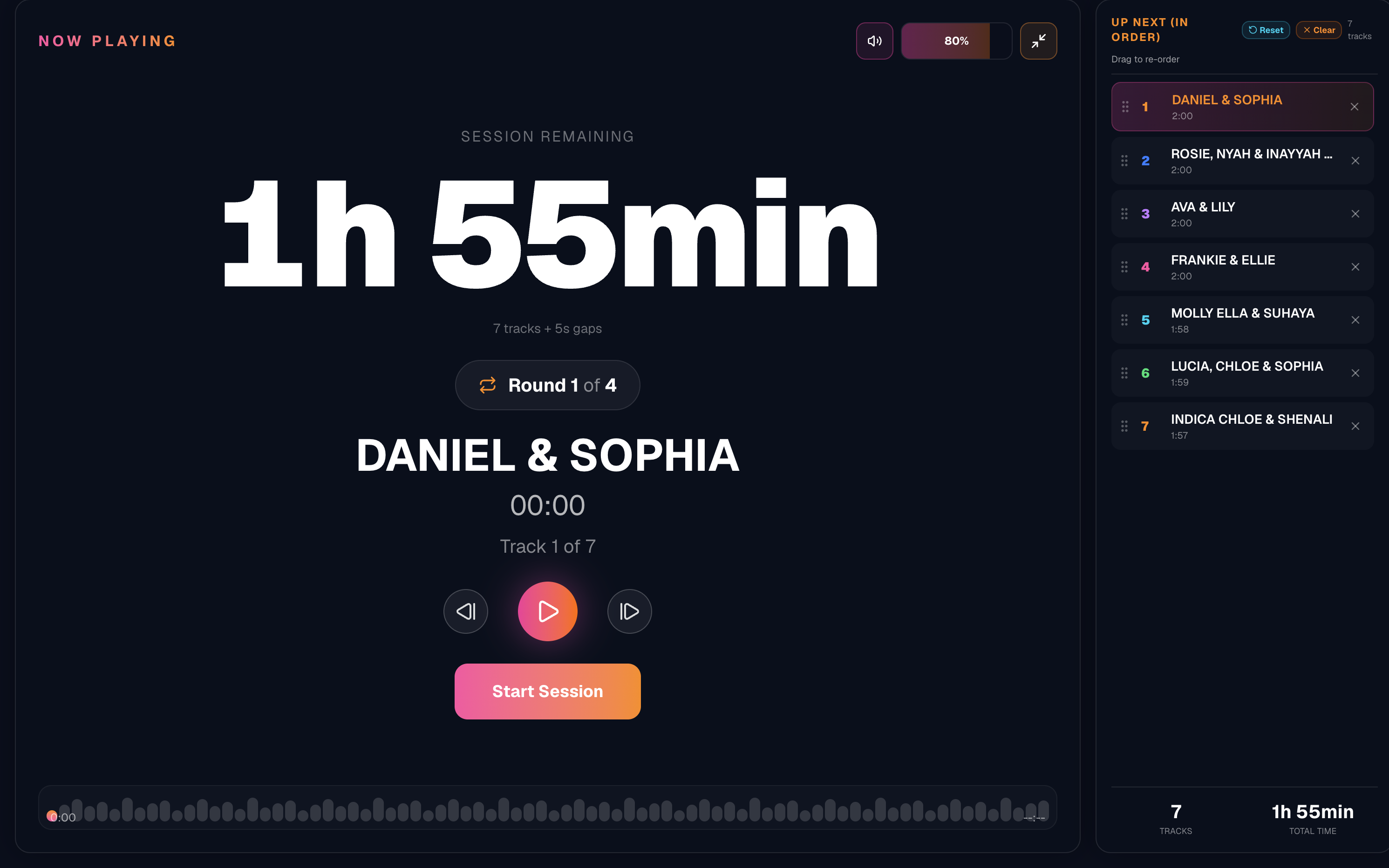
Press play and the whole room can read the clock.
Start the session and EQHO switches to a full-screen view — a giant countdown of the time remaining, the current round, the track that is playing and the running order down the side.
Upload to Cloud
Back up every playlist to your account.
Download from Cloud
Restore your sessions on any device.
TRAINING PLAYLIST
7 tracks · 13:54
TIGERS ACRO CUP
5 tracks · 12:14
SHOWCASE 2026
9 tracks · 21:03
- Push a playlist to save its audio and running order to your account.
- Once you push a playlist, it is stored securely and backed up on your account.
- Build a session at home, then log in at training to download or load the playlist you pushed.
Cloud storage
Your sessions, saved and backed up.
When you push a playlist to EQHO Cloud, its audio and running order are securely saved to your account. Log in on another supported device and download or load the pushed playlist before training or travelling to a competition.
Any device
Build at home. Coach at the venue.
EQHO Player runs in any web browser on desktop, tablet and mobile. Prepare a session on your laptop and push it to EQHO Cloud, then log in on a tablet or phone at training and download or load the pushed playlist — it is the same account everywhere you log in. For the best experience on iPad and iPhone, download the free app from the App Store.
Use it in any web browser on desktop — nothing to install.
Coach from a tablet or laptop browser at the side of the training session.
Download the free app for the best experience on iPad and iPhone.
Load your session before you travel so it plays from your device.
Everything included
The full feature set.
Keep your running order
Arrange routines exactly as you need them for the session.
Control the gaps
Choose how much time plays between routines.
Repeat without searching
Replay routines without leaving the session view.
Build useful playlists
Prepare playlists for partnerships, groups or complete sessions.
Keep sessions moving
Move through the running order without stopping to find music.
Use supported devices
Access pushed playlists on supported desktop, tablet and mobile devices.
Try the whole player for yourself.
Create an account and build your first session in around 30 seconds. No card required.